Perceptual hashing
Two photos, one hash, and a two-bit difference.

md5 will tell you two files are different. It won't tell you they're the same picture.
Take the same photo and save it at 2000, 1000 and 500 pixels wide. Three files, one image:
md5sum road-2000.jpg road-1000.jpg road-500.jpg
# 37059a5daa35a69f425d278652ba8085  road-2000.jpg
# 78d1891e4e9cbd07e0fc507b0131dc1a  road-1000.jpg
# 2bd1c7e34de06ccfbcb83e33e1b3b0aa  road-500.jpg
Three different strings. Put them in binary and count the bits that flip: 67 between the first two, 69 between the extremes. Same street, same light, same everything.
md5 is doing its job. It answers whether two files are identical, and these three aren't. But that's not the question a photo library asks.

Sixty-four bits
A perceptual hash answers a different question: do these two images look like the same thing? It starts by throwing away almost all the information. The image is squashed to 64×64 and converted to greyscale, so every photo becomes the same 4096 numbers.
Then ph takes the 2D DCT of that grid. The top-left corner of the result holds the low frequencies — the slow changes that survive a resize, a recompression or a change of color. It keeps the first 8×8 of those values, compares each one to the median of the 64, and writes a 1 when it sits above the median. Sixty-four bits. Sixteen hex characters.
require "vips"
require "ph"

def pixels(path, size = 64)
  image = Vips::Image.new_from_file(path)
  image = image.thumbnail_image(size, height: size, size: :force)
  image.colourspace(:grey16).to_a.map(&:flatten)
end

pixels("road-500.jpg").first.size # => 64

PH.hash(pixels("road-2000.jpg")) # => "c3f9756332c22c5c"
PH.hash(pixels("road-1000.jpg")) # => "c3f9756332c22c5c"
PH.hash(pixels("road-500.jpg"))  # => "c3f9756332c22c5c"
The three files md5 called different now produce the same hash. That's the whole trick: the hash describes the shape of the light, not the bytes that store it.
One detail I had to fix: PH.hash returns a hex string without leading zeroes. Pad it if you plan to store it or compare vectors.
hash = PH.hash(pixels("road-500.jpg"))
format("%016x", hash.hex) # => "c3f9756332c22c5c"
A two-bit difference
Now take that same frame and change the colors. Two files, the same hash:
PH.hash(pixels("original.jpg"))  # => "c3f9756332c22c5c"
PH.hash(pixels("recolored.jpg")) # => "c3f9756332c22c5c"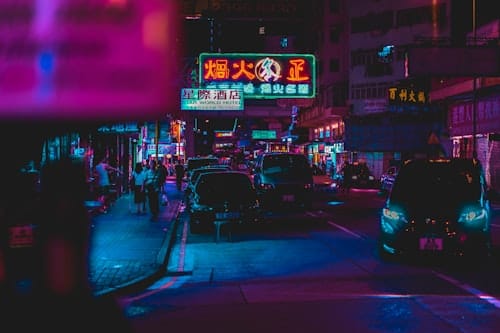
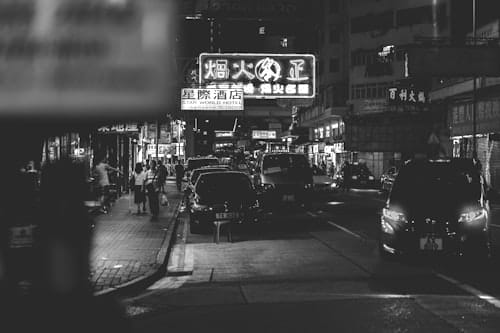
Then modify a few pixels on purpose:
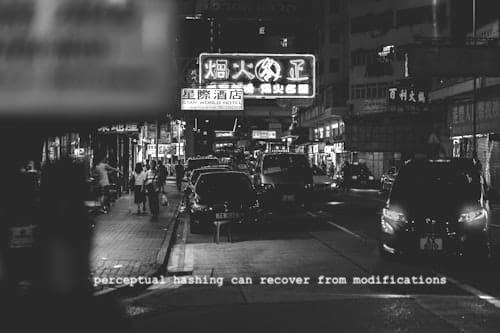
modified = PH.hash(pixels("modified.png"))
# => "c3f9756332c22ccc"

Hamming.distance("c3f9756332c22c5c", modified)
# => 2
Two bits in the fingerprint for a visibly altered image. That's the property that makes this useful: the hash is stable where it should be and moves when the image really changes.
An unrelated image gives a different scale of number:
onion = PH.hash(pixels("onion.jpg"))
# => "a7b61ac861b8dc6a"

Hamming.distance(PH.hash(pixels("road-500.jpg")), onion)
# => 36
Thirty-six of sixty-four bits. Close to a coin flip. The two-bit gap and the thirty-six-bit gap are both just numbers in the same space, which is the point: you can rank by them.
Hamming
Comparing two hashes is an XOR and a popcount. Nothing more. hamming does that, and converts between the hex form and the 64-element vector when you need to store one or the other:
require "hamming"

Hamming.hash_to_vector("c3f9756332c22c5c").length
# => 64

Hamming.distance("c3f9756332c22c5c", "c3f9756332c22ccc")
# => 2

Hamming.vector_to_hash([1, 1, 0, 0, 0, 0, 1, 1])
# => "c3"
Both libraries are small on purpose. ph is the hash, hamming is the distance, and neither needs anything beyond the pixels you hand it.
Visualization
If you want to see the corner instead of reading about it, this widget resizes an image to 32×32, keeps the same 8×8 corner and draws a dot for every bit. It starts with the photo above. Drop a file, paste one, or use the camera on a phone.
It won't give you the same hash as ph — it runs on 32×32 instead of 64×64 — but it shows the same shape.
Sixteen hex characters, sixty-four bits, and the only thing that matters is how many of them flip.


